How to report whether a charger works
Open the charger on the map and choose its status in the “Drivers' experience” section. The report and rating appear immediately, with no account or registration.
Translated from Serbian. Where the exact wording matters, the Serbian original applies.
Step by step
- On the map, tap the charger. Its card opens.
- Scroll down to the “Drivers' experience” section. Under the question “Been here? Tell others how it went.”, choose the status: Works, Works, with a problem, Not working or No charger here.
- If you like, add a rating from 1 to 5 stars, a comment of up to 500 characters and a name or nickname of up to 40 characters.
- Press “Send”. The message “Thank you! Your report has been saved.” means that the report is already visible on the card.
- If you have a photo of the charger, add it with the “Add a photo” button (what to photograph).
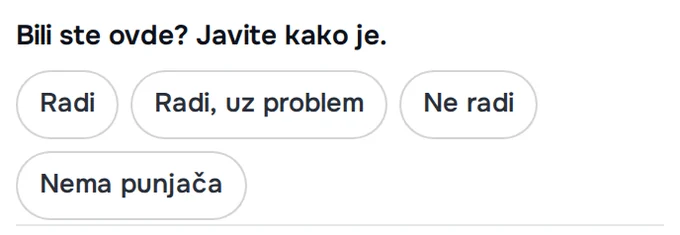
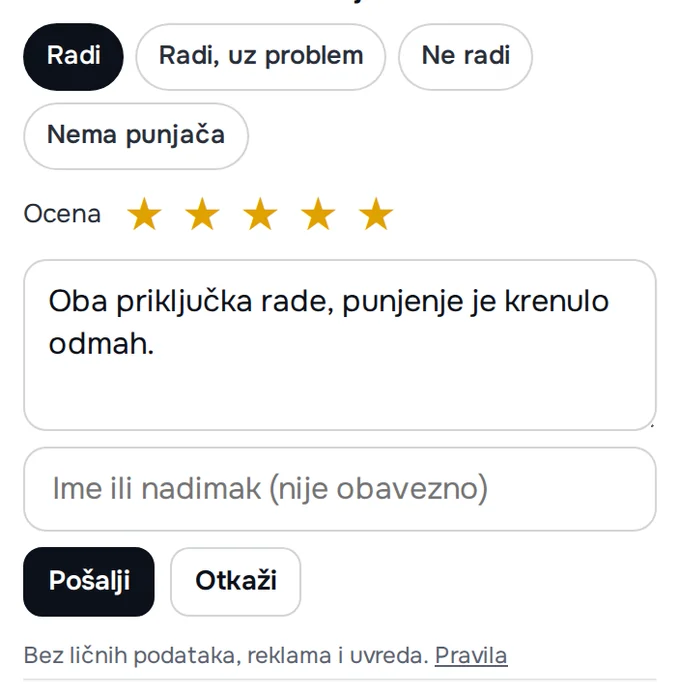
Which status to choose
- Works: charging started and went without problems.
- Works, with a problem: you charged, but something was not right, for example one connector does not work, the power is lower or the payment got stuck. Say what in the comment.
- Not working: charging could not start.
- No charger here: there is no charger at that location.
A specific comment is the most useful: which connector, what power, what the screen or the app said. The time of the report is recorded automatically, so there is no need to write the date.
What happens after sending
The status and rating appear on the card immediately. At the top it says “Latest report” with the status and time, and the most recent reports are below. The average rating is also shown in the charger list, in the line below the name.
A comment with a link, a contact or a rude word waits for review, while the status and rating from the same report appear immediately. In that case, you get the message “Thank you! Your report has been saved; the comment will be published after review.” Reviews are done by the site's editor, usually within a few days.
A report does not change the “Confirmed” label or the colour of the dot on the map (what “Confirmed” means). A report stays on the card as long as the charger is on the map or until you ask for it to be deleted.
If that does not help
- “Sending failed. Please try again.” Check your connection and send it again; without internet, the report cannot be sent.
- “Too many reports for today. Please try tomorrow.” The number of reports per day from one connection is limited, to protect against abuse.
- “Please wait a few seconds and send it again.” The report was sent right after the card was opened; send it again in a moment.
- “Drivers' reports cannot be loaded right now.” The connection to the site has dropped or the site is not responding at the moment; the reports appear once the connection is back.
- The charger is not on the map or is in the wrong place: add it or send a correction.
Was this helpful?
Thank you for your feedback.
Sent. Thank you.
Sending failed. Write to [email protected].
Updated 28.09.2026 · Report an error in the text