What “Confirmed” means — and what it does not
Confirmed means that the charger exists. It does not mean that it is working right now.
Translated from Serbian. Where the exact wording matters, the Serbian original applies.
The rule
The checking rule is described on the map page, in the “Where the map data comes from” section. Every charger has been checked against the lists the networks publish themselves: Charge&GO, the Charge&GO roaming map with the Orion eMobility chargers, Tesla and JP “Putevi Srbije”. Chargers from those lists that were missing from the open databases have been added to the map. The rest were looked up on Google Maps: if they exist and have driver ratings from the past year, they count as confirmed. A few chargers were confirmed on the location owner's website. Everything else is labelled “Not confirmed”: such a charger may no longer exist or may not be public. The date of the check is shown on each charger's card.
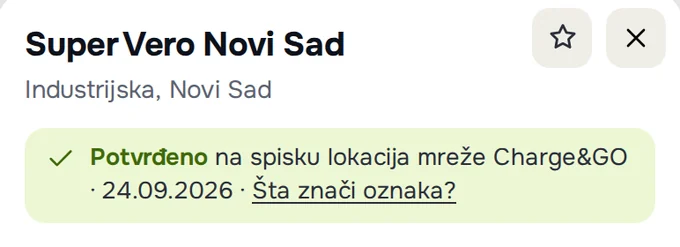
“Confirmed” means the charger exists. It does not mean it works right now. The network's list and a recent rating show that the charger is at that location. They do not show whether it is broken, in use or switched off today.
How a charger gets its label
Separately: a driver's report on the card shows how the last charge went (“Latest report”). It does not change the label or the colour of the dot.
What the card shows
- Confirmed, with the source and date of the check. The source is a network's list (Charge&GO, the Charge&GO roaming map, Tesla, JP “Putevi Srbije”), recent driver ratings on Google Maps or the location owner's website.
- Not confirmed, with the reason and date of the check. The charger is only in the open databases, or it is on Google Maps without a rating from the past year, or the network's list shows it in trial operation.
- Reported broken: drivers say in recent reviews that the charger is not working. The dot is grey, and the list shows a “!” sign.
An unconfirmed charger is faded on the map, with a “?” next to its power, and has a “?” sign in the list. The “Confirmed” switch above the list shows only confirmed chargers, and the line above the list then says how many there are.

Is it working now: drivers' reports
The second, separate signal is the “Drivers' experience” section on the card. It shows the latest report, for example “Latest report: Not working, 2 days ago”, then the average rating and the latest reports with comments.
The driver chooses one of four states: “Works”, “Works, with a problem”, “Not working” or “No charger here”. The report shows up immediately after sending (how to send one).
Drivers' reports do not change the “Confirmed” label or the colour of the dot. The label says that the charger exists; a report says how things went when someone last charged there.
For state-owned chargers on motorways, the card also has a “Charger status” section, based on the list of JP “Putevi Srbije” and with the date of that list.

Step by step: before you set off
- Switch on “Confirmed” if you need a charger that is known to exist.
- Open the card and look at the latest report and its date.
- Check the charger's status in the network's app when you set off.
- After charging, report how it went, so that the next driver has fresh information.
Was this helpful?
Thank you for your feedback.
Sent. Thank you.
Sending failed. Write to [email protected].
Updated 28.09.2026 · Report an error in the text